


Swagelok E-Commerce FAQ

Enhanced Online Purchasing Experience
Swagelok launched its new e-commerce site on May 24th, 2021. In this first release of our site, you will find detailed product information and related resources such as catalogs, CAD files, blog articles, product selector tools, and reference guides. Discover unfamiliar, yet relevant products and services through improved filtering capabilities, updated search technology, and similar product suggestions. We are excited to build and expand on functionality, and hope you are open to sharing your experience with us.
Expanded Functionality
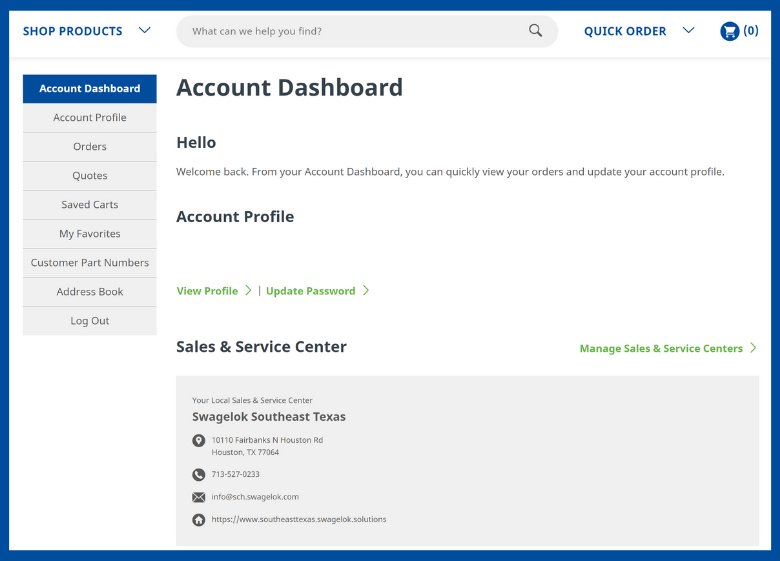
Account Dashboard
Everything together all in one place. View quotes and order history, add and save customer part numbers, and create "favorites" part lists, all in one easy-to-access location. Want to learn more? Access our Quick Reference Guide here.
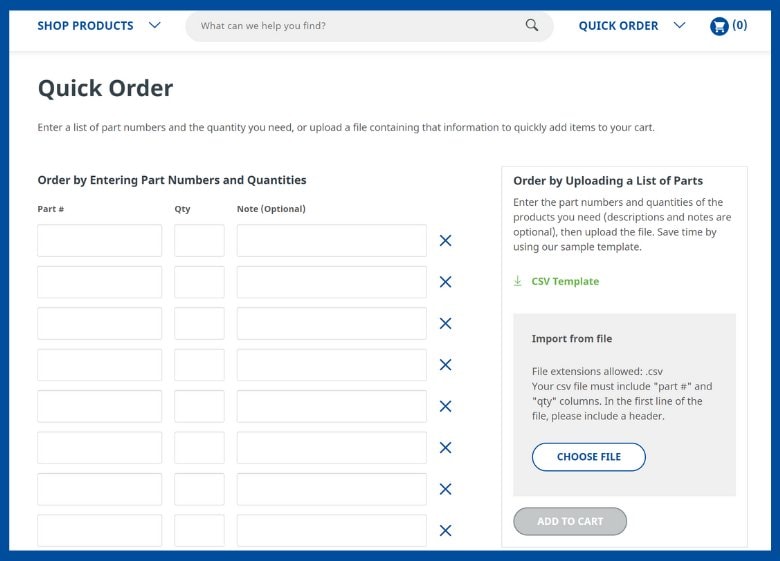
Quick Order
Know what you already want? Quickly enter part numbers into the form, import from your own spreadsheet, or use our template. To learn more how to submit orders, view our Quick Reference Guide here.
Learn More
Take a tour and learn more about logging in, building a shopping cart, and many more features on the new and enhanced Swagelok e-commerce site.
Frequently Asked Questions
How do I log in?
Use the email address you originally registered your account with. You no longer need a separate user name. If you do not have an account, click the Register button.
Can I upload a spreadsheet with part numbers and quantities?
Yes! You can upload your spreadsheet from the Quick Order feature or download the available template and enter in your information.
Can I share a chart with colleagues?
From your cart, click on the envelope icon in the right hand corner and all items in your your cart will be emailed to your contact(s).
What if I have multiple sales and service center accounts?
With the new e-commerce site, you can easily add and manage sales and service center locations with one account in the Account Dashboard.
I can't find a part number that I know exists. How do I add it to my cart?
Enter the part number and quantity into the Quick Order form and Add to Cart. The part number will come across to our Customer Service team for validation via quote submission.